GParted Live
GParted Live is a bootable partition tool for Windows users who need to reorganize disk space without running an editor inside Windows.
Operating system: Windows
Publisher: Bart Hakvoort
Release : GParted Live 1.8.1
Antivirus check: VirusTotal report
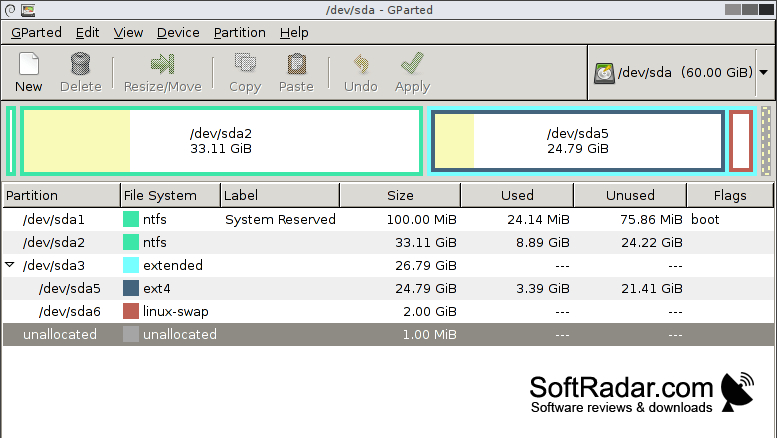
GParted Live provides a graphical workspace for changing how a drive is divided. A Windows user might use it to adjust the size of a system partition, make room for another operating system, or prepare a new drive. The computer must be restarted and booted from suitable media before the editor can be used.
Booting separately from Windows lets you adjust a disk’s layout, including partitions used by the operating system.
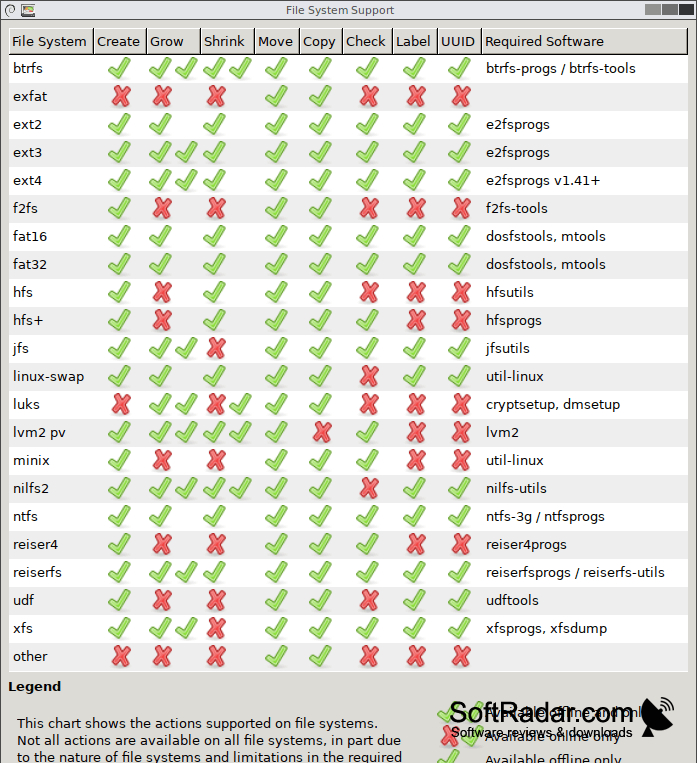
Once the bootable environment has started, you select a storage device and arrange changes to its partitions in the editor. You can add or remove partitions, alter their size or position, duplicate them, and assign labels. The tool also handles partition tables, flags, alignment, and checks. It works with hard drives, solid-state storage, USB drives, and some RAID configurations.
Features:
- Resize and relocate existing partitions
- Add or remove disk partitions
- Duplicate partitions on a disk
- Assign partition labels and flags
- Set up GPT or MBR partition tables
- Check partitions for file system errors
Bootable USB drive or optical disc
BIOS or UEFI boot capability
PROS
Supports many filesystems and complex disk layouts.
Queues multiple partition operations before applying changes.
CONS
Unfamiliar Linux interface complicates advanced partition tasks.
Moving large partitions can take hours.

