GrandPerspective
A utility for Mac OS X visually displaying disk usage with customizable tree maps
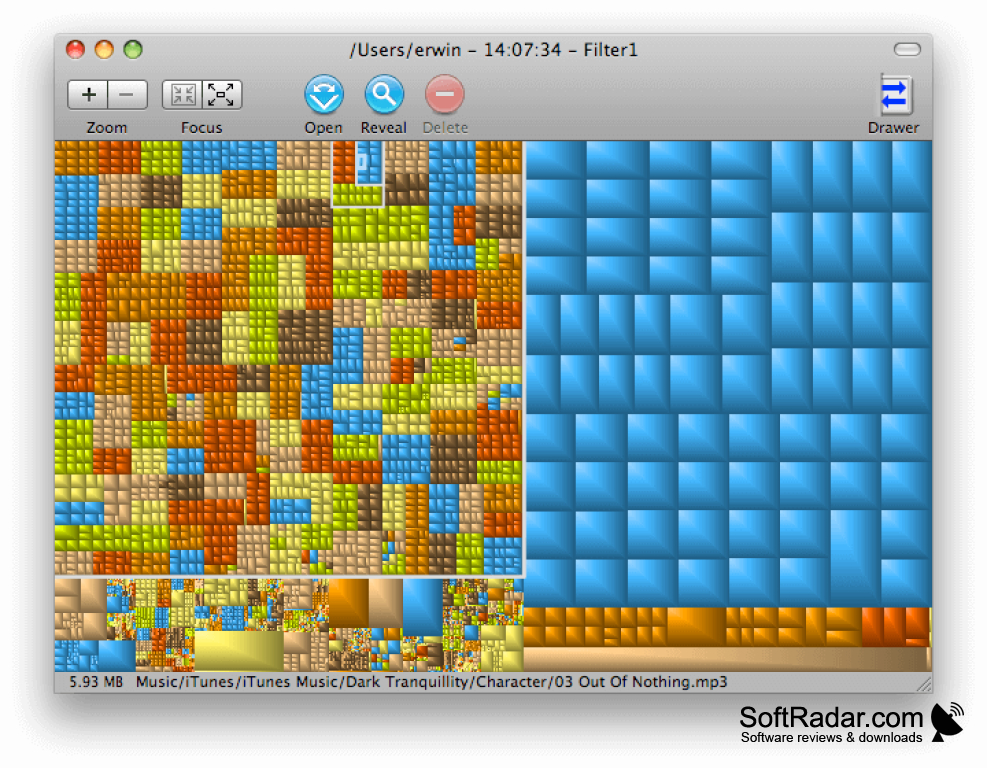
GrandPerspective is a utility application for Mac OS X that provides a graphical representation of disk usage within a file system. This valuable tool assists in hard drive management as it allows you to easily identify which files and folders are taking up the most space. To visualize disk space, GrandPerspective uses what is called a treemap. Each file is represented as a rectangle, with the area of the rectangle proportional to the file's size. Files within the same folder are grouped together, but their arrangement is otherwise arbitrary.
Features:
- Visualization of disk usage through treemaps
- Variety of color mapping schemes and color palettes
- Configurable mapping by file type
- Optional package content viewer
- Full volume display (optional)
"GrandPerspective enables easy identification and management of the largest files and folders on your Mac."
Aside from file visualization, GrandPerspective offers user-friendly navigation within views. You can move up and down through the folder hierarchy and select files and folders in the view. It's also possible to reveal files and folders in Finder and remove them from the view. File and folder filters are also supported for a more customized experience.
An outstanding feature of GrandPerspective is its support for multiple views. You can re-scan a view to compare results pre and post-cleanup or duplicate a view for different displays of the same data. The software also allows you to save the results of disk scanning operations and images of views.
In terms of performance, GrandPerspective boasts a responsive user interface and requires modest memory and disk space. It is fully internationalized and comes with comprehensive help documentation. Furthermore, the software is available as a universal binary, enhancing its flexibility and compatibility with a variety of platforms.
Modest memory and disk space required
Supports multiple views and rescan functionality
PROS
Offers user-friendly navigation and customizable filters.
Support for multiple views and comparison tools.
CONS
Interface may be confusing for tech novices.
Limited customization of visualization options.


