
PhotoX Batch Watermark Creator
PhotoX Batch Watermark Creator adds text, logo and QR code watermarks to many photos at once and can resize and adjust them in the same run.
Operating system: Windows
Publisher: Evinco Solutions Limited
Release: PhotoX Batch Watermark Creator 6.4.1
Antivirus check: VirusTotal report
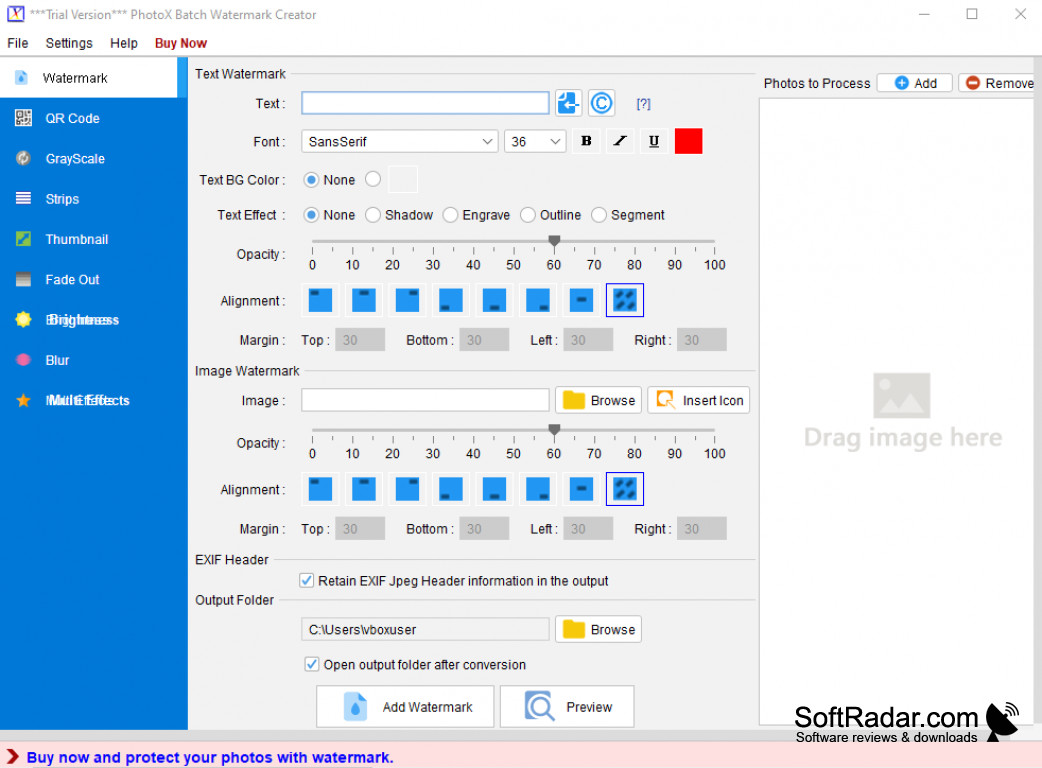
PhotoX Batch Watermark Creator from Evinco Solutions is a Windows program for adding watermarks to many photos at once. A text watermark, an image logo or both are placed on every picture with adjustable position and opacity, and QR codes can be stamped as well, which is useful for shops, photographers and bloggers.
Watermarks and edits whole photo folders in one pass.
Several effects can be combined in one run, for example a watermark together with resizing and conversion to greyscale. Brightness and contrast can be adjusted, and blur, strip, fade-out and thumbnail effects are available. JPEG, PNG, BMP, TIFF and RAW photos are supported, and all processing is done offline on the computer. The program is sold with a one-time licence.
Features:
- Batch text and logo watermarks
- QR code stamping
- Several effects in one run
- Resize, greyscale and colour adjustments
- JPEG, PNG, TIFF and RAW input
- Works fully offline
PROS
One-time licence, no subscription.
Works fully offline.
CONS


