
USB Lockit
USB Lockit is a free portable tool for Windows and Android that locks USB flash drives with a PIN and AES 256-bit encryption.
Operating system: Windows
Publisher: Nicola Bezze
Release: USB Lockit 2.8
Antivirus check: VirusTotal report
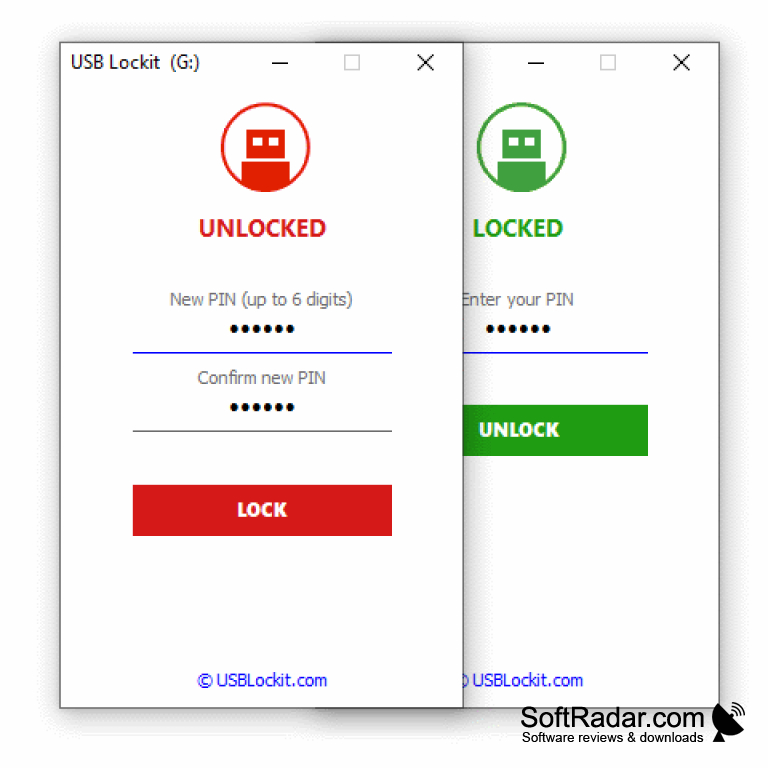
USB drives are commonly used to secure data or store backups of important files. Many people store sensitive or confidential work-related information on USBs. Since these storage devices are really small, they can be lost easily. So what if someone else gets their hands on your lost device and uses it for malicious purposes? Well, you can take preventive measures by protecting your USB with a PIN code.
USB Lockit is a free tool that provides efficient PIN protection for USB flash drives. This tool was developed with the main purpose of preventing unauthorized access to your USB in case of loss or theft. This is fulfilled by encrypting the drive's file system with Advanced Encryption Standard that has a key size of 256 bits. This also includes the boot partition of your USB drive, and the stored PIN itself is encoded.
USB Lockit sets PIN protection with AES 256-bit encryption on USB flash drives for free.
Features:
- Simple interface with a PIN field and LOCK / UNLOCK buttons.
- Locks the USB drive within a few seconds.
- USB Lockit is available in multiple languages, including English, German, French, Spanish, Italian, Portuguese, Russian and Chinese.
- PINs can be set on USB flash drives formatted in exFAT or FAT32.
- Can be used without root or administrator rights.
- A PIN of up to six digits protects the drive.
- Keeps your files safe on every operating system while the drive is locked.
- USB Lockit is 100% portable.
- Also available on Android devices with USB OTG support.
USB Lockit can be downloaded for free for Windows or Android through the official website. To lock the drive and protect your data, you merely have to follow a simple process. On Windows, copy the program to the unlocked USB drive, set a PIN code and click on the lock button. Your USB will be secured in a few seconds. When you want to use your USB drive again, run USB Lockit, enter your PIN and click on the unlock button.
USB Lockit is a locking tool, so if you forget your PIN, it will be difficult to recover your data. The free version does not offer a recovery option, while the Premium version can use a previously saved recovery key to unlock the drive. The hidden USB Lockit data file must never be deleted while the drive is locked, otherwise the data is lost. The tool does not work with SD cards or bootable drives. If you keep a secure record of your PIN, then USB Lockit is a useful preventive tool.
USB flash drive formatted in FAT32 or exFAT
PROS
Ensures data encryption for enhanced file security.
Works on both Windows and Android devices.
CONS
Forgotten PIN can be recovered only in Premium.
Does not work with SD cards or bootable drives.