
EVGA Precision X
Change the voltage, memory speed, clock speed, and fan speed of your graphic card

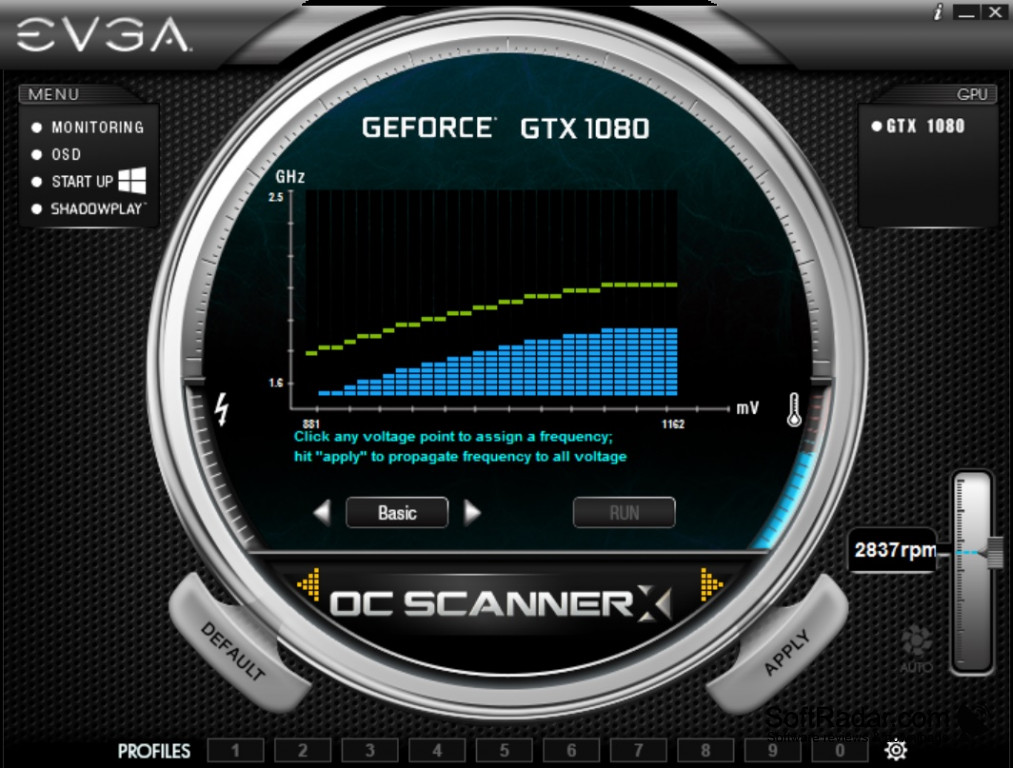
This overclocking GPU controller software enables you to customize a multitude of factors to optimize your graphics with regards to fan cooling speed, clock speeds, energy consumption voltage, frame rate, and memory speed. Precision X also provides gamers with other tools such as in-game screenshots and steam achievements. On top of the available customization, Precision X gives you real-time readings on a multitude of parameters as well. This data is necessary for knowing the best way to tweak your system to accommodate the user's personal needs. Good overclocking software is a necessity for intermediate to advanced gamers and a good choice for novices as well. Having so much control means you maximize the potential of your GPU giving you peak performance with enhanced visual quality. You want the best out of your graphics card, and Precision X can give that to you.
Features:
- Fine tune and modify Voltage
- Graphics card and memory speed control
- Fan speed adjustments
- Clock speed control and monitoring
- In-game screenshots
- GPU temperature monitoring
- Compatibility with Invidia and select ATI graphics cards
- On-demand display of multiple parameters
- Freeware software available to everyone
EVGA's Precision X is a great cost-effective way to get the most out of your graphics hardware when quality and/or efficiency are important to the user. With a large number of features integrated into this software, even advanced users will find Precision X to be a useful tool always looking to stay a step above the rest.
This is a free software giving you valuable control over a wide range of parameters for your computer graphics.
Operating System Requirements:
- Windows Versions 10, 8, 7, XP or Vista
- 32 or 64-bit operating system
GPU Requirements:
- Full support of Nvidia graphics cards
- Full support of EVGA graphics cards
- Select support for ATI graphics cards
PROS
Incorporates real-time monitoring of GPU statistics.
Stable and reliable with a user-friendly interface.
CONS
Occasionally experiences stability issues.
Lacks detailed instructions or user guide.


