
Gigabyte Fast Boot
Gigabyte Fast Boot lets users of compatible Gigabyte motherboards change startup settings from Windows, including modes that skip some hardware checks.
Operating system: Windows
Publisher: Gigabyte Technology
Release: Gigabyte Fast Boot 24.0418.1
Antivirus check: VirusTotal report
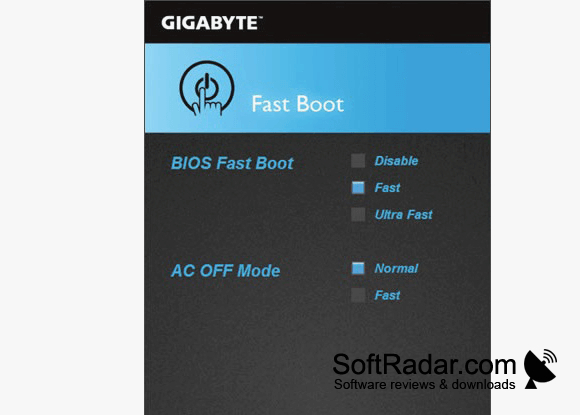
Gigabyte Fast Boot lets owners of compatible Gigabyte motherboards adjust startup behavior from Windows instead of entering BIOS setup. It is installed as a module in Gigabyte APP Center, which must be installed first. The utility is for people who want to shorten routine startups or return to standard startup behavior when checking connected hardware.
Switch between regular and quicker startup modes without opening the motherboard’s BIOS setup screen.
A single window provides Disable, Fast and Ultra Fast settings, along with an AC OFF Mode option. These controls change the corresponding motherboard BIOS setting, allowing faster modes to skip some hardware checks before Windows loads. Skipping those checks may cause startup problems after devices are changed or stop responding. The utility supports Windows 10 and Windows 11 on 64-bit systems.
Features:
- Select Disable, Fast or Ultra Fast mode
- Change startup settings without entering BIOS setup
- Configure the AC OFF Mode option
- Access controls through Gigabyte APP Center
- Adjust the motherboard’s BIOS fast boot setting
- Restore standard hardware checks by disabling fast boot
Requires GIGABYTE APP Center
PROS
Shortens startup by skipping some hardware checks.
CONS
Fast boot can make BIOS access difficult.
Hardware changes may cause boot problems.


