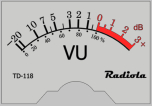
VU Meter
A standalone VU meter for Windows that shows the level of the stereo sound output like an analog audio meter.
Operating system: Windows
Publisher: Burnsy Enterprises
Release: VU Meter 1.1
Antivirus check: VirusTotal report
VU Meter is a pretty simple app that shows the level of the sound played through your Windows speakers, just like the volume unit meters of old stereo equipment. The features are few, of course, but the program does its primary job well. VU Meter was developed for Windows Vista and newer versions of Windows (it was also tested on Windows 7), so that's its main operating system. The program also has forums on its SourceForge project page, where users can report problems and send suggestions. It is written in C#, released as free open-source software, and it only monitors the audio output: it does not record or convert audio files.
The main benefit is, without a doubt, a clean and easy-to-navigate interface with no toolbars or window dressings, so the meter can be placed over other windows without getting in the way. The colour scheme can be changed to your liking, and the chosen settings are remembered. All options and commands are available from a right-click menu. The program is designed to mimic old stereo volume meters, adding a bit of vintage style to the desktop.
VU Meter is a standalone VU meter focusing on simplicity, with a clean analog-style display that stays out of the way.
Features:
- Simple, yet capable interface without toolbars, which makes the program easy to understand and use in the long term
- Always-on display: the meter keeps working while you use other programs, so you can watch the levels during playback or recording
- Adjustable response time (the time it takes the needle to make a complete swing), with 150 ms and 300 ms settings
- Capable of setting the maximum amount of the VU being metered. It is useful for anyone working with audio recorded at lower levels, and in some other situations
- The meter shows the left and right channels separately, with the levels displayed as percentages rather than decibels
There are, expectedly, no updates coming out (the last release dates from 2013), plus a low amount of configuration options. One more disadvantage is that only stereo output is shown, with no options for 5.1 channel audio, and microphone input and ASIO drivers are not supported. Overall, VU Meter is a solid choice for what it tries to be, and even with its relatively outdated approach it still does its job just fine.
Microsoft .NET Framework
PROS
Free and open-source software.
Clean interface without toolbars or window frames.
CONS
Does not support ASIO drivers or microphone input.
Shows levels in percent rather than decibels.