FaceTrackNoIR
FaceTrackNoIR is a free head-tracking program that turns a simple webcam into a FreeTrack/TrackIR-compatible head tracker for games and flight simulators.
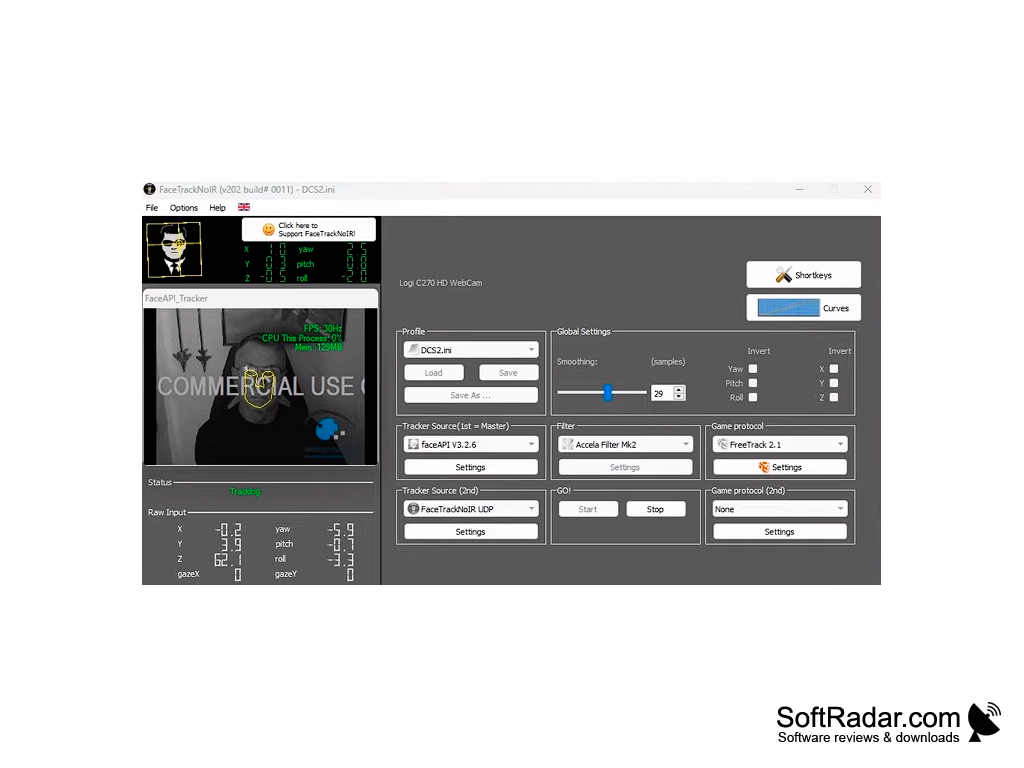
FaceTrackNoIR is a software program for tracking head movements in real time in games and simulators. The application does not require any special accessories, just one working Web-camera.
Today, no one will be surprised by programs and gadgets that track the movements of the head, which not only facilitate the gameplay, but also make it much more immersive. FaceTrackNoIR stands out among them for two reasons. First of all, it's free. Secondly, the user does not need to wear special devices on his head to work with the program, be it a helmet, headphones, clips, reflective markers, etc. FaceTrackNoIR only needs a Webcam connected to your computer, with which the user's head becomes a virtual joystick: you simply turn your head to look around in the game.
FaceTrackNoIR was created in C++ using the Qt toolkit for the user interface. The program runs on Windows XP, Vista, 7, 8 and 10. It uses the FreeTrack protocol (TrackIR compatible) as well as its own FaceTrackNoIR UDP protocol, SimConnect for FSX and Prepar3D, MouseLook and a FlightGear protocol, and it can be used with PPJoy and VJoy. The program is compatible not only with modern PC games, but also with a number of old simulators, for example, with CFS3. Its modular design lets you choose among several head trackers (faceAPI, PointTracker for IR markers, Tobii eye trackers, a joystick, Android and iOS phones), filters and game protocols, while curves for each axis define how head movement is translated into in-game movement.
The main benefit of using FaceTrackNoIR is its ability to enhance gameplay through real-time head tracking, requiring only a webcam and no additional accessories.
For the convenience of working with FaceTrackNoIR, you can use keyboard shortcuts or mouse buttons, which can be used to start and stop the tracker, center the view and disable a selected set of axes. Settings are stored per game in INI files, and the program can start tracking automatically when it is launched.
Webcam, IR markers, Tobii eye tracker or smartphone
Game or simulator with head-tracking support
PROS
Supports a wide variety of games and applications.
Customizable settings for personal preference.
CONS
Requires a well-configured webcam.
The software isn't always accurate or responsive.