
MAGIX Music Maker Premium
Create music at home
Operating system: Windows
Publisher: MAGIX Software
Release : MAGIX Music Maker Premium 1.3.45.37
Antivirus check: VirusTotal report
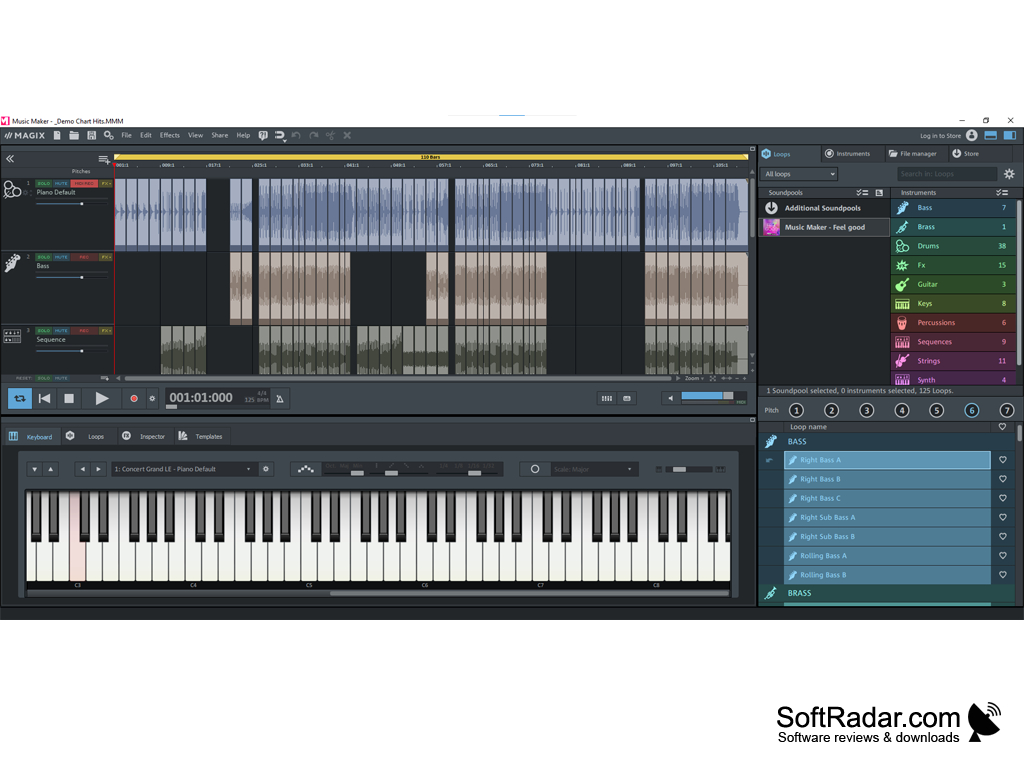
MAGIX Music Maker turns your desktop computer into a fully-featured studio mixer, mixing and remixing audio to make your musical dreams come to life. Play a dozen different instruments, or give Music Maker your composition to play them for you (including chorus and orchestra). Then combine them with your own vocals or with snippets from the hundreds of thousands of clips from Music Maker's Soundpools. Or if you're more of a hands-on type, the Live Pad mode lets you feel the rhythm of the music as you mix and remix your way through your track. Finish up your songs with a wide range of audio effects, and then spend time in the mastering suite to get each note just right (or let Music Maker auto-master your song for you). This premium version also includes iZotope Ozone 8 Elements for even more mastering power -- more bass and more boom! -- and SoundForge for fine-tuning out even the smallest pop or crackle.
Features:
- Software instruments, played by you or the computer: strings, drums, bass, power guitar, chorus, or full orchestra.
- Live Pad mode to remix on the fly, feeling the beat as you go along.
- Looping, combining, and other powerful editing tools.
- Access to hundreds of thousands of audio clips through Soundpools.
- Free audio effects.
- Guitar amplifier app.
- Mastering suite with Auto Master.
- iZotope Ozone 8 Elements
- SoundForge
Gain access to hundreds of thousands of usable audio clips of every genre and instrument with Soundpools.
MAGIX Music Maker lets you become an artist and technician at every level, allowing you to let everyone else hear the music within you.

- Processor: 2 GHz or higher
- Minimum 2GB of RAM
- At least 700MB free hard drive space
PROS
Offers a wide variety of instrument and loop selections.
Includes high-quality audio effects for professional sound editing.
CONS
Steep learning curve for beginners.
Lacks advanced audio editing tools and features.